النص الإنجليزي: Back to the guide
هذه الترجمة أُنشئت آليًا ولم تخضع بعد لمراجعة متحدث أصلي.
النص الإنجليزي: How to… · النص الإنجليزي: How-to guide
النص الإنجليزي: Put dates in your calendar
النص الإنجليزي: Add a single event or subscribe to a dated list, then check the result in your calendar app.
النص الإنجليزي: Step 1 — Choose the dates
النص الإنجليزي: Open الآن with JavaScript switched on. No account or email address is needed. اتخذ إجراءً قبل lists action deadlines. قريبًا lists events. Read the row's date and open its title to check the published record before saving it.
النص الإنجليزي: Step 2 — Save one event
النص الإنجليزي: Open الاجتماعات and select a meeting title to open its meeting page.
النص الإنجليزي: On a meeting's page, choose Add to calendar among its actions. This control appears only when the record has a clock time. Open the downloaded file in your calendar app and check the event's title, date and time.
النص الإنجليزي: This is a one-time copy: it will not update if the event changes. If only a day is published, the control is absent. CityScroll supplies no clock time for a date-only event. For a continuing list, use the next step.
النص الإنجليزي: Step 3 — Open a calendar subscription
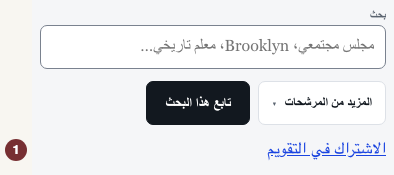
النص الإنجليزي: Open الاجتماعات. Enter a topic in بحث. Open المزيد من المرشحات to choose نطاق التاريخ or المنطقة المتأثرة. Then choose الاشتراك في التقويم in the toolbar above the records. The control appears only when the list contains dated items. If absent, widen the filters until dated records appear. The panel names the list you are about to subscribe to.
النص الإنجليزي: If the filter panel covers the toolbar, close المزيد من المرشحات and choose الاشتراك في التقويم.

النص الإنجليزي: Step 4 — Add the subscription in your calendar app
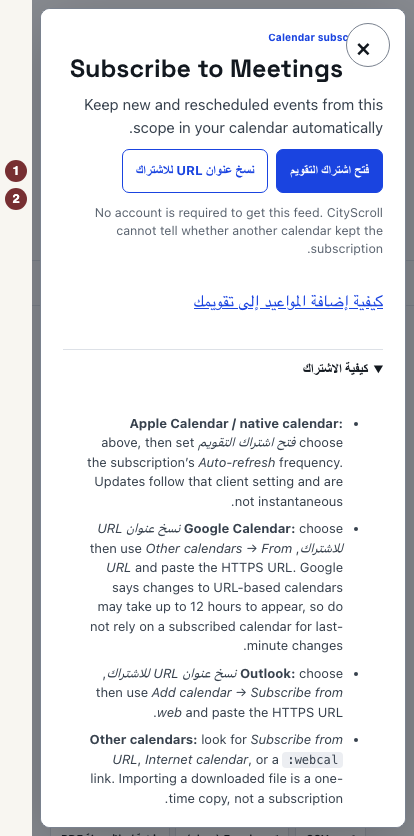
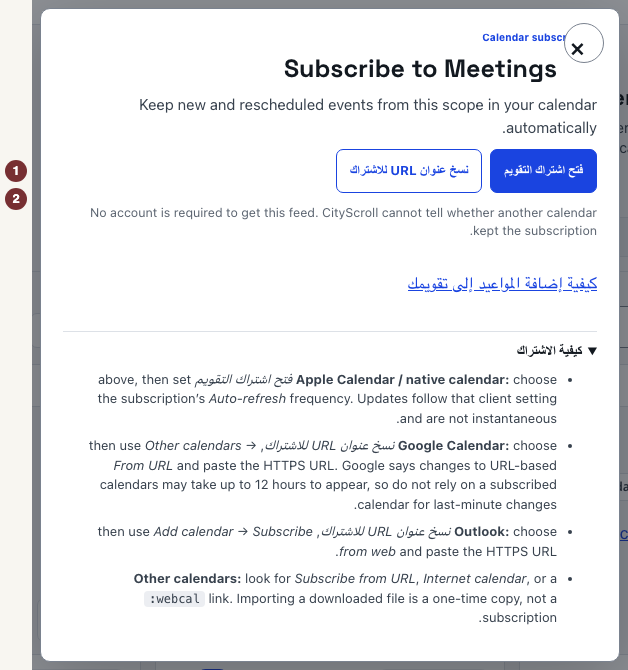
النص الإنجليزي: In that panel, choose the route your app supports:
- النص الإنجليزي: فتح اشتراك التقويم opens your device's calendar app. Add the subscription there. In Apple Calendar, set its Auto-refresh frequency.
- النص الإنجليزي: نسخ عنوان URL للاشتراك copies an address. In Google Calendar, paste it under Other calendars → From URL. In Outlook, use Add calendar → Subscribe from web.
النص الإنجليزي: Check in your calendar app that it lists a subscribed calendar and displays the expected dates. CityScroll cannot confirm that a subscription was added or refreshed. Importing a downloaded file is a one-time copy. Only a URL your calendar keeps fetching is a subscription.
النص الإنجليزي: Subscriptions keep date-only deadlines as all-day entries and mark cancelled events as cancelled. Updates follow your calendar app's refresh schedule. Check the official record for last-minute changes.
النص الإنجليزي: When dates are missing
النص الإنجليزي: If Now lists an action with no published closing date, there is no deadline to export. Open التنبيهات to watch for updates instead. If a source could not be reached, the answer is unknown: reload before treating the list as empty.