انگریزی ماخذ: Back to the guide
یہ ترجمہ مشین کے ذریعے تیار کیا گیا ہے اور ابھی تک کسی مقامی بولنے والے نے اس کا جائزہ نہیں لیا۔
انگریزی ماخذ: How to… · انگریزی ماخذ: How-to guide
کسی تاریخ کے مطابق ریکارڈ دیکھیں
انگریزی ماخذ: Filter an agency to a chosen date and share or clear that view.
انگریزی ماخذ: Step 1 — Apply a day
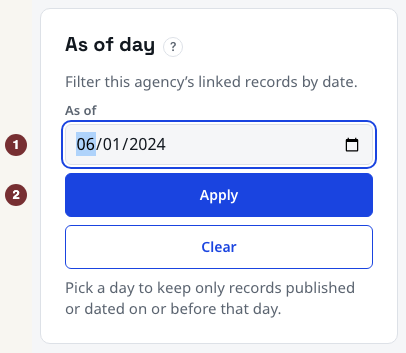
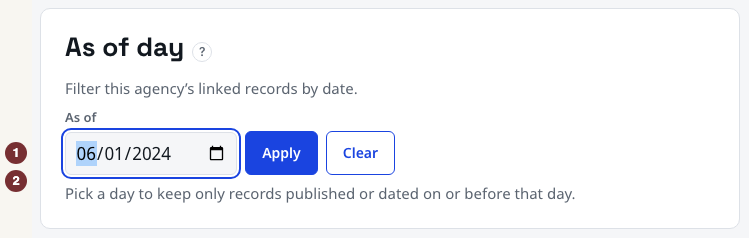
انگریزی ماخذ: Open Parks and Recreation with JavaScript switched on. No account is needed. In the اس تاریخ تک panel, enter 1 June 2024 in اس تاریخ تک and press لاگو کریں. The date stays selected and the summary counts records dated on or before it. The Parks example link opens the same filtered view.
انگریزی ماخذ: This filters currently linked records by their event or publication date. It is not a reconstruction of what CityScroll knew that day. Undated records are excluded because they cannot be placed on a timeline.
انگریزی ماخذ: Step 2 — Inspect what was set aside
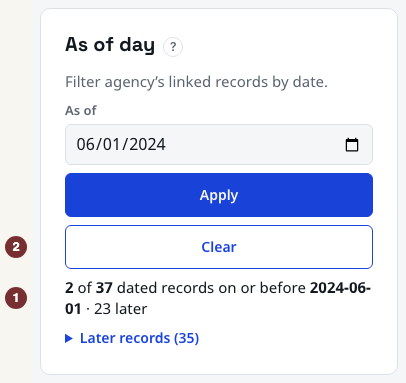
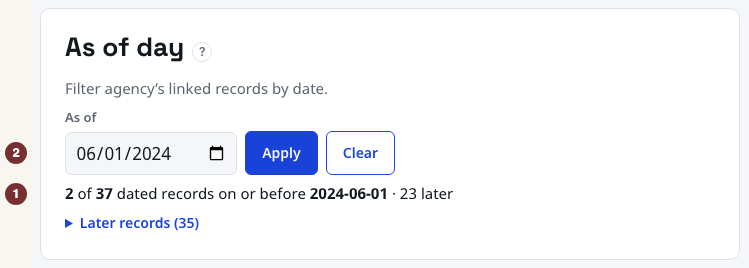
انگریزی ماخذ: Under the count, open بعد کے ریکارڈ. These records have dates after your chosen day. Compare the retained and later counts. Their values can change as records are added or corrected. An empty retained set means no dated records currently linked here meet the cutoff, not that the agency did nothing then.
انگریزی ماخذ: Step 3 — Share the selected day
انگریزی ماخذ: While the date is applied, copy the full browser address and paste it into a new tab. Check that اس تاریخ تک holds the same day and the summary still names the cutoff. Share that address to repeat the filter against the records available when opened.
انگریزی ماخذ: Step 4 — Clear the filter
انگریزی ماخذ: Next to لاگو کریں, choose صاف کریں, which appears after a date is set. The date selection clears and the page again invites you to pick a day. Repeat these steps on another agency from People + organizations when you need a different cutoff.
انگریزی ماخذ: When the filter does not apply
انگریزی ماخذ: Without JavaScript, submitting the date returns an unfiltered page. Enable JavaScript and press لاگو کریں again, then check the summary before relying on the result.