CityScroll

Back to the guide

Start here · Tutorial

Trace a notice to the duty behind it

Follow one real Sanitation rule notice back to the section of the City Charter that told the agency to write it, and read that law at its own source.

How do I get from a published notice to the law that required it?

Last reviewed 2026-09-05

What you will do

Most city notices exist because something told the agency to publish them. This tutorial follows one real notice back to that something: a final rule from the Department of Sanitation, and the section of the New York City Charter that put the agency in charge of the subject in the first place.

By the end you will have read the rule notice, opened the duty behind it, read that duty at the city's own source, and seen which notices are on record as filings against it. You will also be able to say what the trail does not prove.

Before you start

Step 1 — Open the notice

Open the Sanitation final rule notice.

It is titled DSNY Final Rule re Implementation Dates for the Brooklyn North and Upper Manhattan Commercial Waste Zones. Its own official copy sits behind the Official record link, on The City Record Online, which is where the city published it.

Checkpoint: you are on a single notice, with its title and its link to the city's published copy.

Step 2 — Find the duty the notice answers to

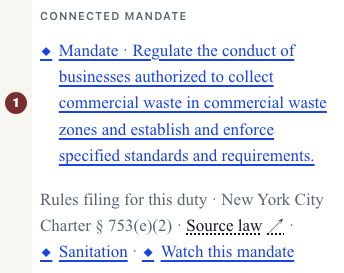
Scroll to the block headed Connected mandate.

It names one duty, in the words the law uses: regulate the conduct of businesses authorized to collect commercial waste in commercial waste zones, and establish and enforce specified standards and requirements. Underneath it, three short pieces of information do the real work.

Checkpoint: you can say, in one sentence, which duty this notice is a filing against and where that duty is written down.

Step 3 — Open the duty itself

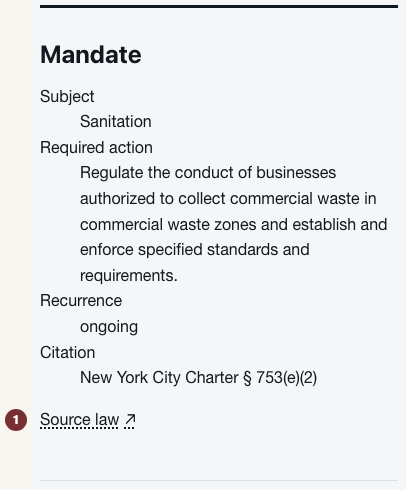
Click the duty text. It takes you to /mandates/64116-001, the page for that one duty.

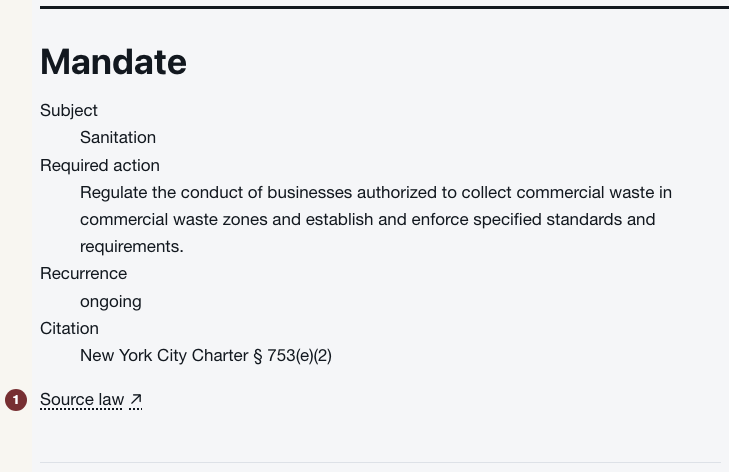
The page is short on purpose. It carries the subject agency, the required action, how often the duty recurs, and the citation, and then a link labelled Source law.

Checkpoint: you are on a page about a duty rather than about a notice, and it names Sanitation as the agency that carries it.

Step 4 — Read the law at its own source

Open Source law. It leaves CityScroll for the city's own legislation site, where the underlying item is published.

This is the same habit the first tutorial ends on. CityScroll is a reading aid: it collects what has been published and shows you where to confirm it. The law is the city's, and the city's copy is the one to rely on.

Checkpoint: you have the underlying legislative item open on a nyc.gov site, in the city's words.

Step 5 — See what has been filed against the duty

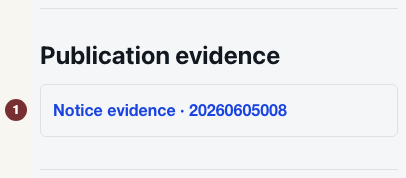
Go back to the mandate page and read the section headed Publication evidence.

It lists the notices that are on record as filings against this duty — including the one you started from. That is the loop closing: you arrived from a notice, and the duty knows about that notice in return.

Checkpoint: the notice you came from appears in the list, by its request number.

Step 6 — What this trail does not prove

This is the most useful part of the lesson, and it is worth being blunt about.

So the honest sentence at the end of this trail is: the city published a rule that answers to this duty. Not: the agency has satisfied this duty. Whether a filing is complete, timely or sufficient is a question for the agency, the Council, or a court.

Checkpoint: you can name the difference between a filing existing and a duty being met.

Optional — Watch the duty instead of the notice

Back on the notice, next to the connection, there is a Watch this mandate link. It carries you to Following with the duty already chosen, so you can be told when something new is filed against it rather than checking by hand.

That is the only step here that asks anything of you, and it is optional. Following is an interactive part of the site and needs JavaScript switched on. Everything else in this tutorial works signed out and without it.

What you learned

Where to go next

Try the same three steps on another rule notice: open it, look for a Connected mandate block, and follow it to the duty and its source.

If the block is not there, that is information too. It means no supported connection has been drawn for that notice — not that no law lies behind it. To see how those connections are made and what evidence sits under them, read how to check the evidence behind a connection.

Sources used in this article

Open the Sanitation notice this tutorial uses