انگریزی ماخذ: Back to the guide
یہ ترجمہ مشین کے ذریعے تیار کیا گیا ہے اور ابھی تک کسی مقامی بولنے والے نے اس کا جائزہ نہیں لیا۔
انگریزی ماخذ: How to… · انگریزی ماخذ: How-to guide
انگریزی ماخذ: Collect records, add notes, and export them
انگریزی ماخذ: Pin records, save notes, and choose between a local export and a shared copy.
انگریزی ماخذ: Step 1 — Pin two records
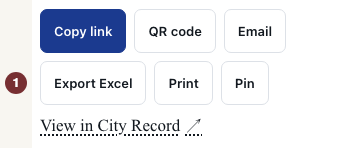
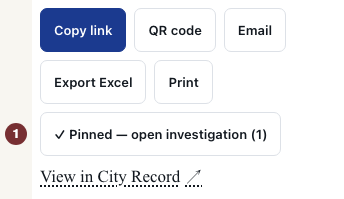
انگریزی ماخذ: Open the West 50th Street award notice with JavaScript switched on. Among the record's actions, choose پن کریں. The confirmation links to the workspace and shows the item count. Open the named organization and choose پن کریں there too. Pin appears on individual records, not search results.


انگریزی ماخذ: Step 2 — Add and check a note
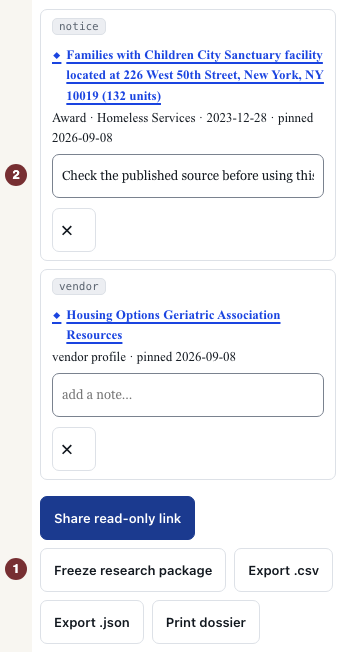
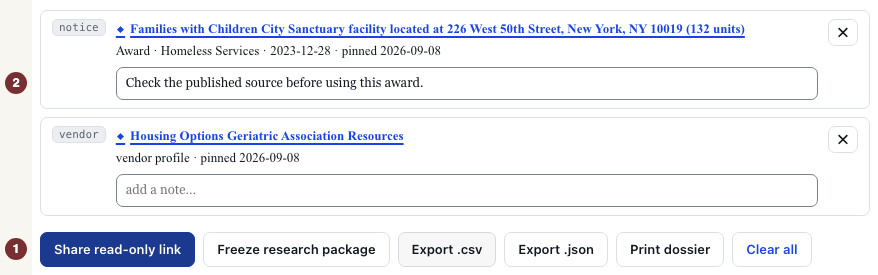
انگریزی ماخذ: Open میری تحقیقات in the page footer, or your investigation. Check that both records appear under تحقیقاتی ورک اسپیس · صرف اسی براؤزر میں محفوظ. No account is needed. Under a record, type in ایک نوٹ شامل کریں…, then click outside the field to save. Reload and check that the note remains.
انگریزی ماخذ: In an ordinary signed-out visit, the collection stays in this browser. Clearing its site data removes it. A session recognized through a CityScroll email can keep pins across devices.
انگریزی ماخذ: Step 3 — Export a copy
انگریزی ماخذ: Below the items, choose .csv ایکسپورٹ کریں for a spreadsheet or .json ایکسپورٹ کریں for structured data. Open the downloaded file and check the records, notes and links. Both files are fixed copies. They do not update. دستاویز پرنٹ کریں opens the browser's print window to print or save a PDF.
انگریزی ماخذ: Step 4 — Share only after checking the notes
انگریزی ماخذ: Read your notes before choosing شیئر کریں (صرف پڑھنے کے لیے لنک) below the items. This uploads a snapshot, including notes, to CityScroll. Anyone with the link can read it without a password for 90 days. It is separate from your local list and does not follow later edits.
انگریزی ماخذ: Open the returned link in a new tab. Shared investigation should show the records and notes without editing controls. A recipient can import a copy into their own investigation.
انگریزی ماخذ: When an action is unavailable
انگریزی ماخذ: If sharing reports a server failure, keep the local list and use .csv ایکسپورٹ کریں or .json ایکسپورٹ کریں. تحقیقی پیکیج منجمد کریں requires a supported comparison. For ordinary pinned records use those exports.
انگریزی ماخذ: Choosing سب صاف کریں empties the local investigation immediately without confirmation. Use it only when ready to remove that list. Existing exported files and shared snapshots remain. An empty workspace explains how to start again: open an individual record and choose پن کریں.