How to… · How-to guide
Read a land-use project's next step and documents
Check a project’s current stage, next published opportunity and official documents.
Step 1 — Open the project
Open land-use projects with JavaScript switched on. Enter the project's name in ZIP or place above the list. For practice use Timbale Terrace. Select its title and check project number 2022M0258. Reading here submits nothing and starts no subscription.
Step 2 — Read the stage and authority
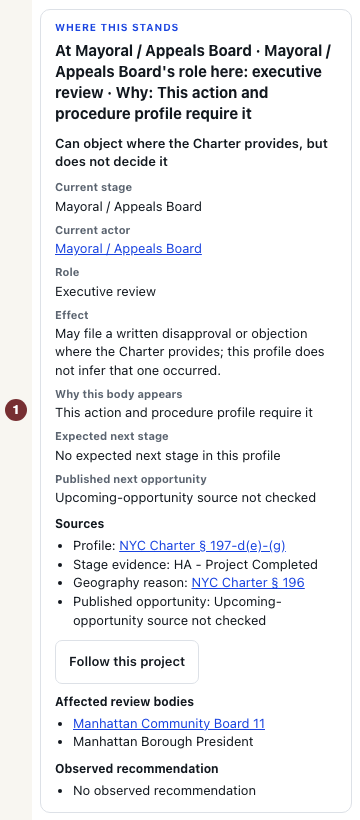
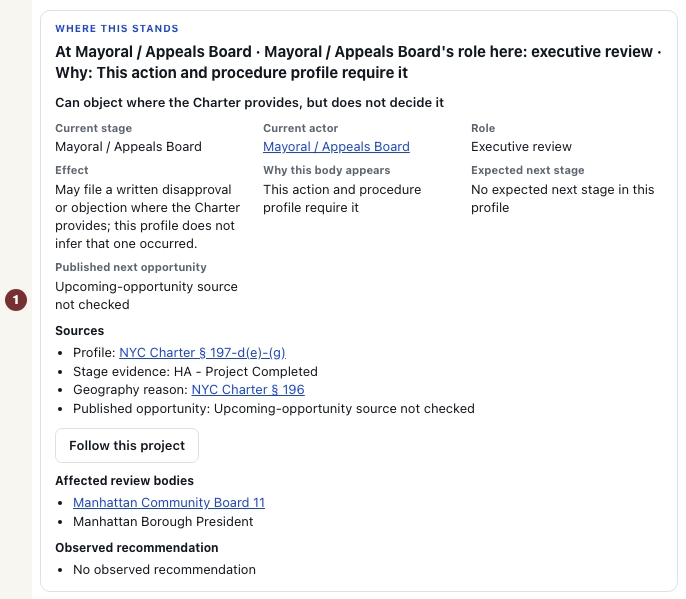
In Where this stands, read Current stage, Current actor and Role together. The role tells you whether the body can decide or only recommend. A recommendation is not approval. Then read Expected next stage and Published next opportunity. The former is the usual next step, while the latter is a published chance to participate when a date is available.
Check each date's label before planning around it. A window calculated from statutory review periods is not an appointment. Clocks can pause. Use a published opportunity's official source to confirm where and when to participate.
Step 3 — Open the filed documents
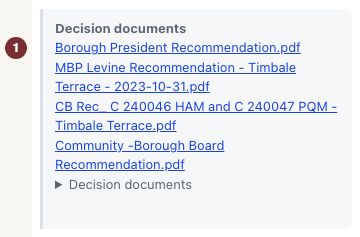
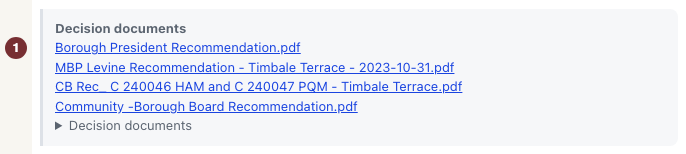
On the project page, find Decision documents and open a document title if one is listed. These are a body's published decisions. Application filings, including a Racial Equity Report where required, serve a different purpose. Read whether a report was required and observed before drawing a conclusion from its absence.
Use Open full ZAP project in the decision-documents area to open its full record in the city's Zoning Application Portal. Check that the project number matches and open the filed document there. If no document is listed on CityScroll, use that same portal record to check the released package.
When a stage or date is unknown
An unknown Where this stands means the available evidence does not establish the stage. No published next opportunity found does not mean there will be none. A source not checked or marked stale leaves the answer unknown. Check the project's portal record and the relevant body's published calendar before making plans.
A report that has not been observed is not automatically late or missing from the applicant's filing. Keep that distinct from a publisher's explicit finding that it was not filed on time.